

Publish your game from Jabali Studio
Publishing puts your game online on Jabali, where anyone with the link can play it. You can publish as often as you like. Each publish creates a new numbered version of your game.
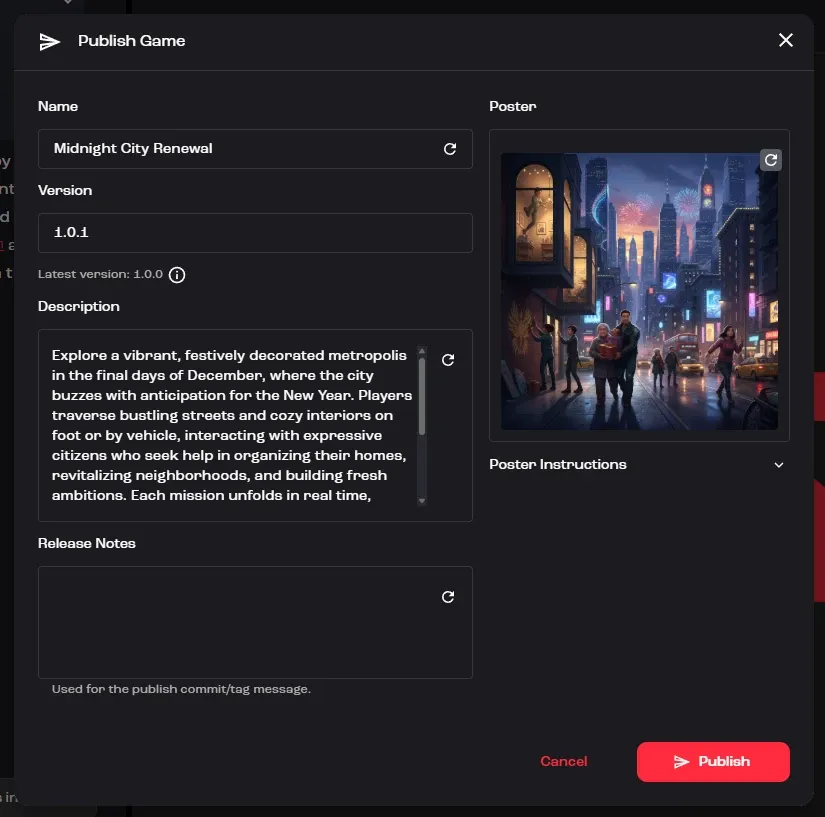
Publish a game
Section titled “Publish a game”- Click Publish in the top-right corner of Studio.
- Fill in or review the details in the Publish Game dialog. See the fields below.
- Click Publish at the bottom of the dialog. A progress bar shows Publishing game while Studio uploads your game.
- When you see Game successfully published, click Copy link to share your game, or Open in browser to play it.
Watch: Why to publish often, and the publish dialog (2:15, from the masterclass AI Game Jam Masterclass)
Publish dialog fields
Section titled “Publish dialog fields”| Field | Required | What to enter |
|---|---|---|
| Name | Yes | Your game’s title, as players will see it. |
| Version | Yes | A version number in the form 1.2.3, higher than the Latest version shown under the field. |
| Description | Yes | A short pitch that tells players what the game is about. |
| Release Notes | No | What changed in this version. Bali can draft these from the changes since your last version. |
| Poster | No | The cover image players see first. Studio uses a default poster until you generate one. |
Let Bali write it for you
Section titled “Let Bali write it for you”Next to Name, Description, Release Notes and Poster you’ll find a regenerate button. Click it to have Bali suggest a new value. Bali bases its suggestions on your game and, when you’ve added them, your design files. Hover over the button to see which files it will use.
For the poster, expand Poster Instructions to give Bali extra direction, such as an art style, a character to feature or colors to use, then click the poster’s regenerate button. A warning icon reminds you to regenerate if you change the instructions afterwards. If you close the dialog without publishing, Studio keeps your previous poster.
Fields you’ve changed are marked with an asterisk.
Pick a version number
Section titled “Pick a version number”Studio fills in the next version for you by increasing the last number. Change it if this release is bigger:
| Increase the… | When you… | Example |
|---|---|---|
| Patch (last) | Fix bugs or make small tweaks | 1.2.3 → 1.2.4 |
| Minor (middle) | Add new features, levels or content | 1.2.3 → 1.3.0 |
| Major (first) | Make big changes that break older versions of the game | 1.2.3 → 2.0.0 |
After you publish
Section titled “After you publish”- Your game is updated on Jabali. Share it with the link from Copy link.
- The new version appears in Version history, so you can see what changed between releases and restore an earlier one if you need to.
- You can also edit your game’s name, description and poster in Project Settings (the gear icon) under Game Settings, where View Page opens your game’s page on Jabali. See Settings.
Troubleshooting
Section titled “Troubleshooting”- The Publish button in the dialog is disabled. Check that Name and Description are filled in and that the version number is valid.
- “Version must be greater than…” The version must be higher than the last published version, for example
1.0.1after1.0.0. - “Version must use the format x.y.z” Use three numbers separated by dots, such as
1.2.3. Don’t add avor extra text. - Publishing failed. Check your internet connection, then try again. If it keeps failing, use the Report button in Bali’s panel to send us details.